Incoming Email
Server: mail.coinet.com
Port: 110
Username: <your username> (this is your email address without the "@coinet.com" part)
Password: <your password> (call us and ask if you do not remember your password
Outgoing Email SEE INSTRUCTIONS BELOW
Mozilla Thunderbird (recommended)
-------------------
Note: The follow instructions are for those who are directly connected to Coinet via a dialup
or DSL connection. If you are connected to the Internet through another ISP or this is
for a cell phone see the instructions under "SMTP Authentication" below.
Download and install the latest version of Thunderbird (it is free!)
Start Thunderbird
Go To "Account Settings" (near the upper right)
Or (on older versions)...
Click on the 3 horizontal bars near the upper right corner
"Account Settings" will be in the drop down menu, or...
In the dropdown list move your mouse over "Options" ("Preferences" in some older versions)
In the secondary dropdown list click on "Account Settings"
In the "Account Settings" window
On the left side at the bottom click on "Account Actions" and select "Add Mail Account" or "Add Email Address"
In the "Mail Account Setup" window
Enter your Name, Email Address and Password (Remember Password should be checked)
Click on "Continue"
Then click on "Manual config"
Edit the "Mail Account Setup" screen so it looks like this (with your name, email and password):
Your Name: John Doe
Email Address: jdoe@coinet.com
Password: ******
x Remember Password
Server hostname Port SSL Authentication
Incoming: POP3 mail.coinet.com 110 None Normal password
Outgoing: SMTP mail.coinet.com 25 None No Authentication
Username: incoming jdoe outgoing jdoe
Then click on "Done". Do NOT click on 'Re-Test', it will get the wrong settings.
If a "Warning" window appears.
Because you are directly connected to Coinet your password does not traverse and is not
exposed on the Internet. And you are authenticated by the IP number which we issued to you.
Just check: I understand the risks, and then click on "Done".
You are done!
But, if it does not work (most likely it will be sending email that does not work):
Delete ALL the configurations you just created:
Go to "Account Settings" (see above instructions)
On the left side highlight <your_username>@coinet.com
On the left at the bottom click on "Account Actions".
In the drop down list click on "Remove Account".
But Wait!! There is more. The outgoing mail server configuration must be deleted separately.
(You can bet we made liberal use of 'salty' words for the Thunderbird coders over this bug.)
On the left near the bottom click on "Outgoing Server (SMTP)"
On the right near the top there will be a list of outgoing mail server configurations.
Highlight the one that starts with "<your_username> -", and click on the "Remove" button.
You can then safely start over.
(I started over 8 times before I found the #&%!*@$ Thunderbird bug.)
Windows 10 ----------
We have found a nice tutorial for Windows 10 email setup.
All of the instructions are applicable with the exception of these
changes to Sections 3 and 4 of "Enter Settings".
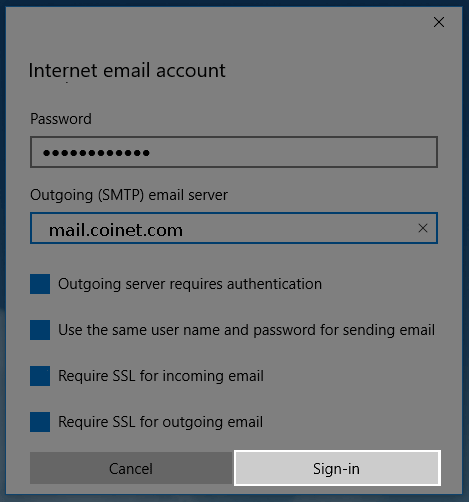
3. On the next screen, enter the following settings:
• Account Name: Anything you would like to name this account.
• Your Name: The name that people will see when you send them an email from this account.
• Incoming Mail Server: mail.coinet.com
• Account Type: Choose POP3
• User Name: Your username is your email address without the "@coinet.com" part.
• Password: Enter the password for your account. Call us if you do not remember it.
• Outgoing: mail.coinet.com
• Uncheck the checkboxes for
"Outgoing server requires authentication",
"Use the same user name and password for sending mail",
"Require SSL for incoming email" and
"Require SSL for outgoing email".
4. Click the "Sign In" button.
The Windows 10 Mail sign in button.
iphone & ipad
-------------
mail icon
Enter (real) name
Incoming mail server (POP3)
mail.coinet.com
username: <your_username> (this is your email address without the '@coinet.com' part)
password: <your_password>
Do not enable any password encryption, the password should be sent as plain text.
Outgoing mail server (SMTP Authentication)
Call Coinet at 389-1303 if you don't know your password. The user's password must be added to the mobile password file!
click on SMTP
mail.coinet.com
username: <your_username> (this is your email address without the '@coinet.com' part)
password: <your_password>
click on Authentication
select Password - (variously described as 'plain text', 'insecurely', 'in the open'
and without encryption, without challenge/response)
port 587
Note: Often the settings for SSL, Authentication and the port are hidden,
and your email will not work until you find them and set them correctly.
(Why they would hide those settings is beyond me. Well actually I know the
reason, the developers at Apple know exactly where to find everything and they
are to stupid to realize that other people do not know where they 'hid' things.)
android
-------
Incoming email
type: POP3
server: mail.coinet.com
username: <your_username> (this is your email address without the "@coinet.com" part)
password: <your_password>
Outgoing email
Call Coinet at 389-1303. The user's password must be added to the mobile password file!
server: mail.coinet.com
server port: 587
username: <your_username> (this is your email address without the "@coinet.com" part)
password: <your_password>
authentication type: plain or password
Microsoft Windows Live Mail ---------------------------
Link to Microsoft's own Windows Live Mail Setup Instructions.
You will need to know:
Your username: <your username> (this is your email address without the "@coinet.com" part)
Your password: <your password> (call us and ask if you do not remember your password
The type of e-mail server Coinet uses:
POP3 - for incoming e-mail messages
SMTP - for outgoing e-mail messages
The incoming (POP3) mail server is: mail.coinet.com
The outgoing (SMTP) mail server is: mail.coinet.com
Uncheck or unselect any additional security, encryption or authentication options
Windows Outlook Express -----------------------
You may print out this page and refer to it while doing the setup.
(If you need to check an existing email configuration Click Here.)
Start Outlook Express
Click on the Outlook Express icon on your desktop (a little envelope)
--or--
Click on Start --> (All) Programs --> Outlook Express
In Outlook Express
Click on Tools --> Accounts
Window name: Internet Accounts
Click on Mail (tab)
Note: Existing mail accounts are listed in the white box. You
may delete any account you no longer need by first high-
lighting the line describing the account and then clicking
on the Remove button to the right.
Click on Add --> Mail (tab)
Window name: Internet Connection Wizard
Window title: Your NameDisplay name: your name
Whatever your enter will be seen by those to whom you send email.
Click on Next
Window name: Internet Connection Wizard
Window title: Internet E-mail AddressE-mail address: your_email_username@coinet.com
Replace 'your_email_username' with your actual Coinet email username.
Click on Next
Window name: Internet Connection Wizard
Window title: E-mail Server NamesMy incoming mail server is aPOP3server.
Incoming mail (POP3, IMAP or HTTP) server: mail.coinet.comOutgoing mail (SMTP) server: mail.coinet.com
Click on Next
Window name: Internet Connection Wizard
Window title: Internet Mail LogonAccount Name: your_email_usernamePassword: passwordCheckRemember passwordUnCheckLog on Using Secure Password Authentication (SPA)
Replace 'your_email_username' with your actual Coinet email username
(without the '@coinet.com').
Replace 'password' with your actual Coinet email password.
Click on Next
Window name: Internet Connection Wizard
Window title: Congratulations
Click on Finish
Window name: Internet Accounts
Click on Close
At this point you should be back in Outlook Express and ready to go.
If you close Outlook and restart it, you should be prompted to connect
(if you are not already connected) and once you are connected you should
receive any email that is currently in your account.
******************************* SMTP Authentication *******************************
Generally (if your email agent is not listed below)
server: mail.coinet.com
server port: 587
username: <your_username> (this is your email address without the "@coinet.com" part)
password: <your_password>
authentication: is required so turn it on or select it or answer 'yes'
authentication type: plain or password or 'transmitted insecurely'
You may select SSL/TLS for encryption
Thunderbird
Download and install the latest version of Thunderbird (it is free!)
Start Thunderbird
Go To "Account Settings"
Here is how...
Click on the 3 horizontal bars near the upper right corner
In the dropdown list move your mouse over "Options" ("Preferences" in some older versions)
In the secondary dropdown list click on "Account Settings"
In the "Account Settings" window
On the left side at the bottom click on "Account Actions" and select "Add Email Address"
In the "Mail Account Setup" window
Enter your Name, Email Address and Password (Remember Password should be checked)
Click on "Continue"
Then click on "Manual config"
Edit the "Mail Account Setup" screen so it looks like this (with your name, email and password):
Your Name: John Doe
Email Address: jdoe@coinet.com
Password: ******
x Remember Password
Server hostname Port SSL Authentication
Incoming: POP3 mail.coinet.com 110 STARTTLS Normal password
Outgoing: SMTP mail.coinet.com 587 STARTTLS Normal password
Username: incoming jdoe outgoing jdoe
Then click on "Done". Do NOT click on 'Re-Test', it will get the wrong settings.
If a "Warning" window appears.
Just check: I understand the risks, and then click on "Done".
If a "Add Security Exception" window appears.
It warns you that the site certificate may be invalid or forged. In part the pop-up says
something like "The certicate is not trusted because it hasn't been verified as issued by a
trusted authority using a secure signature." And it hasn't because we created and signed our
own certificate, and you definately know who we are.
The truth about 'trusted authorities' is that they are all compromised by the NSA and using a
certificate issued from one of them only means we get to pay for the privilege of helping them
spy on your email.
So you should just click on: Confirm Security Exception
You are done!
But, if it does not work (most likely it will be sending email that does not work):
Delete ALL the configurations you just created:
Go to "Account Settings" (see above instructions)
On the left side highlight <your_username>@coinet.com
On the left at the bottom click on "Account Actions".
In the drop down list click on "Remove Account".
But Wait!! There is more. The outgoing mail server configuration must be deleted separately.
(You can bet we made liberal use of 'salty' words for the Thunderbird coders over this bug.)
On the left near the bottom click on "Outgoing Server (SMTP)"
On the right near the top there will be a list of outgoing mail server configurations.
Highlight the one that starts with "<your_username> -", and click on the "Remove" button.
You can then safely start over.
(I started over 8 times before I found the #&%!*@$ Thunderbird bug.)
Outlook Express
Tools-->Accounts--> Mail (tab)
Highlight your account
Click on "Properties"
General tab
Mail Acccount: any recognisable label
E-mail Address: your full email address eg user@coinet.com
Servers tab
Server Information
Incoming is a POP3
Incoming server: mail.coinet.com
Outgoing server: mail.coinet.com
Incoming Mail Server
Account name: your email address without the "@coinet.com" part
Password: your email password
check the box "Remember password"
do NOT check the box "Log on using Secure Password Authentication"
Outgoing Mail Server
check the box "My server requires authentication"
Settings
select "Use same settings as my incoming mail server" (this is the default)
Advanced tab
Server Port Numbers
Outgoing mail (SMTP): 587
do NOT check the box "This server require a secure connection (SSL)
Incoming mail (POP3): 110
do NOT check the box "This server require a secure connection (SSL)
normally you should not check the box "Leave a copy of message on server"
but if you do the be sure to check "Remove from server after 5 days"
iphone & ipad
mail icon
Enter (real) name
Incoming mail server
mail.coinet.com
username: <your_username> (this is your email address without the '@coinet.com' part)
password: <your_password>
Outgoing mail server
click on SMTP
mail.coinet.com
username: <your_username> (this is your email address without the '@coinet.com' part)
password: <your_password>
click on Authentication
select Password - (variously described as 'plain text', 'insecurely', 'in the open'
and without encryption, without challenge/response)
port 587
android
Incoming email
server: mail.coinet.com
username: <your_username> (this is your email address without the "@coinet.com" part)
password: <your_password>
Outgoing email
server: mail.coinet.com
server port: 587
username: <your_username> (this is your email address without the "@coinet.com" part)
password: <your_password>
authentication type: plain or password